VISUAL ROUTINE WORKSHOP · FREE BOARD
Make a now-and-next board without losing your full routine
One complete plan. A separate view for the current pair.
28 September 2026 · Family Tools editorial · Fictional examples
You have a four-step routine. Today you want to show just two steps. Keep the full sequence as your master copy and make a separate view for the pair you need now. That way, tomorrow's routine does not have to be rebuilt.
This is a practical editing guide, with a free paper version and a real Routine Studio demonstration. All names and situations below are fictional. Use a two-step view only if it is useful to the person using it; a longer view may be their preference.
Start with two different jobs
The master routine holds the complete sequence. The now-and-next board shows the current pair. Hiding later steps in a display should not be confused with deleting them from the original.
Our example master is: Choose what to bring → Put on shoes → Check the plan → Leave together. Suppose the choice has already been made. The pair to show is now Put on shoes, next Check the plan. The first pair in the master would be out of date for this moment.
Do it with paper first
Write the complete sequence on a separate sheet. Draw two large boxes headed NOW and NEXT on a second sheet, or use the free board below. Add the words or pictures for the current pair. In this example, put “Put on shoes” under NOW and “Check the plan” under NEXT.
Use the words, pictures or objects that make sense to the person. Ask about their preferred wording or images where possible. Our example symbols are placeholders, not a universal symbol system. There is no need to buy software to try this arrangement.
When the pair changes, replace the two entries. Keep the master sheet intact. Do not mark an activity finished simply because you want the schedule to move on, and do not use NEXT to promise an activity that is not available.
Free now-and-next board
One blank board and a separate fictional example. Open in your browser, then choose Print or Save as PDF. Check the print preview and print only the page you need.
Open the free printable boardThe same edit in Routine Studio
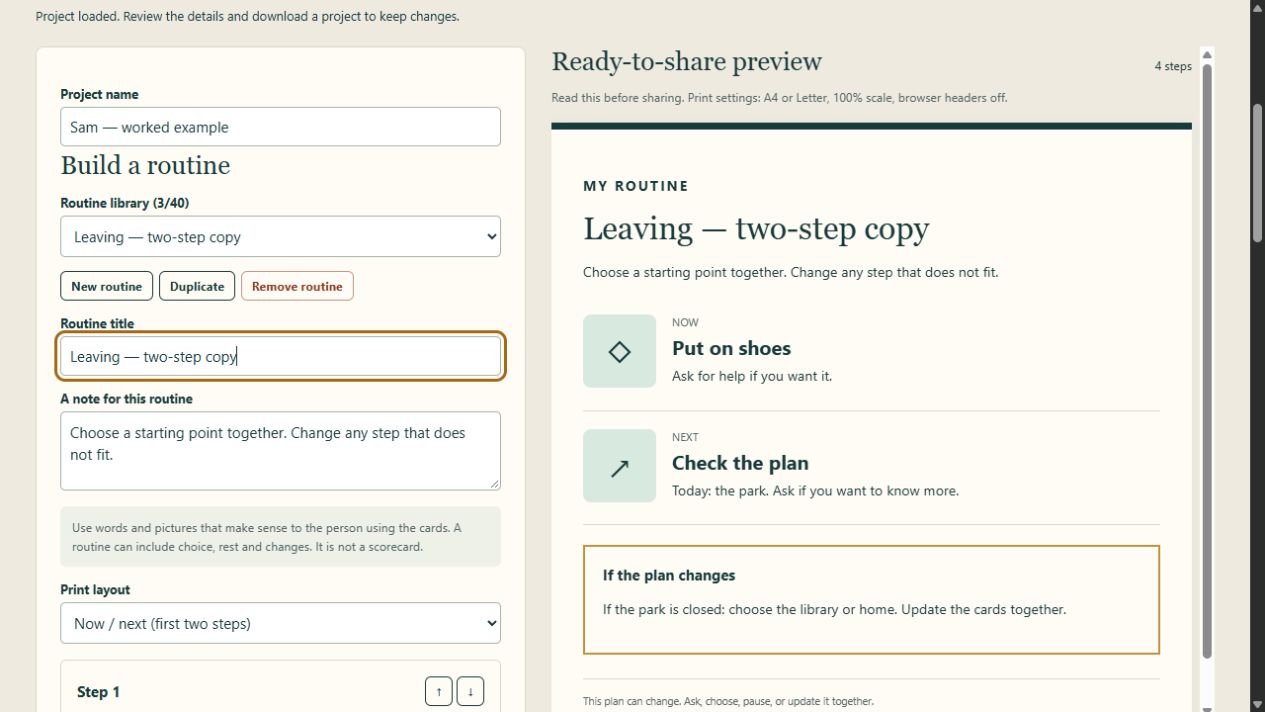
1. Keep the original. Load the fictional example and select “Getting ready to leave” in the routine library. Click Duplicate, then name the copy “Leaving — two-step copy”. The original remains a separate routine in the library.
2. Put the current pair first in the copy. Click the up arrow beside “Put on shoes” once. Then click the up arrow beside “Check the plan” once. The copied routine now begins with those two steps. This changes the copy's order; it does not change the original.
3. Choose the correct display. In Print layout, select Now / next (first two steps). Read the preview: NOW must say “Put on shoes”, NEXT must say “Check the plan”. Do not rely only on the name of the layout.
4. Know what the control does. This layout always displays positions one and two. It does not track completion or advance automatically. The “4 steps” count refers to the stored routine, even though this layout shows two. The other steps remain in the copied routine. If you switch that copy to Whole routine, you will see its reordered sequence.
5. Return to the master deliberately. Select “Getting ready to leave” in the library and choose Whole routine. Check that all four steps remain in their original order. The layout setting applies across the project, so select the layout you want whenever changing routines.
Keep an editable backup as well as the output
Use Download project to save the editable working file. Check that the download exists. Open that file with Open project when you want to continue editing. A printed page or PDF is an output copy; it is not a replacement for the editable project.
Keep the project private: it can contain all routines and embedded photos, including material that is not visible in the selected two-step preview. Before sharing any printed or saved output, read every page and check its wording, images and current plan.
Before using the board
Check three things: is this the pair for the current moment, does the person understand the words or pictures, and is the next activity actually available? If the answer changes, update the board. It is information you can revise, not a scorecard or a test of the child.
Optional: save reusable routines in one place
The free board is enough for a paper version. If you want multiple editable routines, your own photos, duplicate copies, three output layouts and downloadable project backups, Routine Studio is €12 once. It is a desktop browser download: extract the ZIP and open its index.html. No subscription is required. It is an organizational tool, not treatment or an AAC system.
See Routine Studio and its included files
Sources and demonstration scope
Family Fund's visual-support guide describes now-and-next boards, using familiar words or pictures and involving the child where possible. It also stresses that no single visual-support format suits everyone. This source does not endorse our product or validate this editing procedure.
The duplication, ordering and layout instructions were checked against Routine Studio 1.0 and exercised in a local browser preview on 28 September 2026. The screenshot shows the actual app with fictional data. Physical printing, independent family testing and all browser/device combinations remain unverified. The free board does not collect or upload information.