CHILD HANDOVER · FREE REPLACEMENT TRACKER
You updated the child profile. Is everyone still using the old copy?
A clear replacement message. A dated copy. A record of what actually reached the next adult.
28 September 2026 · Family Tools editorial · Fictional examples
Changing your working document is only one part of a handover. The teacher, club leader or familiar adult may still have yesterday's attachment. Make the replacement easy to recognise: a dated version, a short explanation of what changed and a check of which copy each reader received.
Here is a fictional example you can adapt with an ordinary document and notebook. It is for everyday organizational information, not emergency instructions, medication arrangements or formal plans.
First, confirm the change
In our example, a club leader confirmed on 28 September that the next activity will be in the larger room. Sam asked to see the room before the activity. Those are two different sources: the leader's confirmation and Sam's preference. Keep that distinction in your wording.
Before replacing a profile, check that the information is current and discuss the wording and intended readers with the child where possible. If a change is uncertain, mark it as something to check rather than rewriting it as a fact.
Give the replacement a recognisable identity
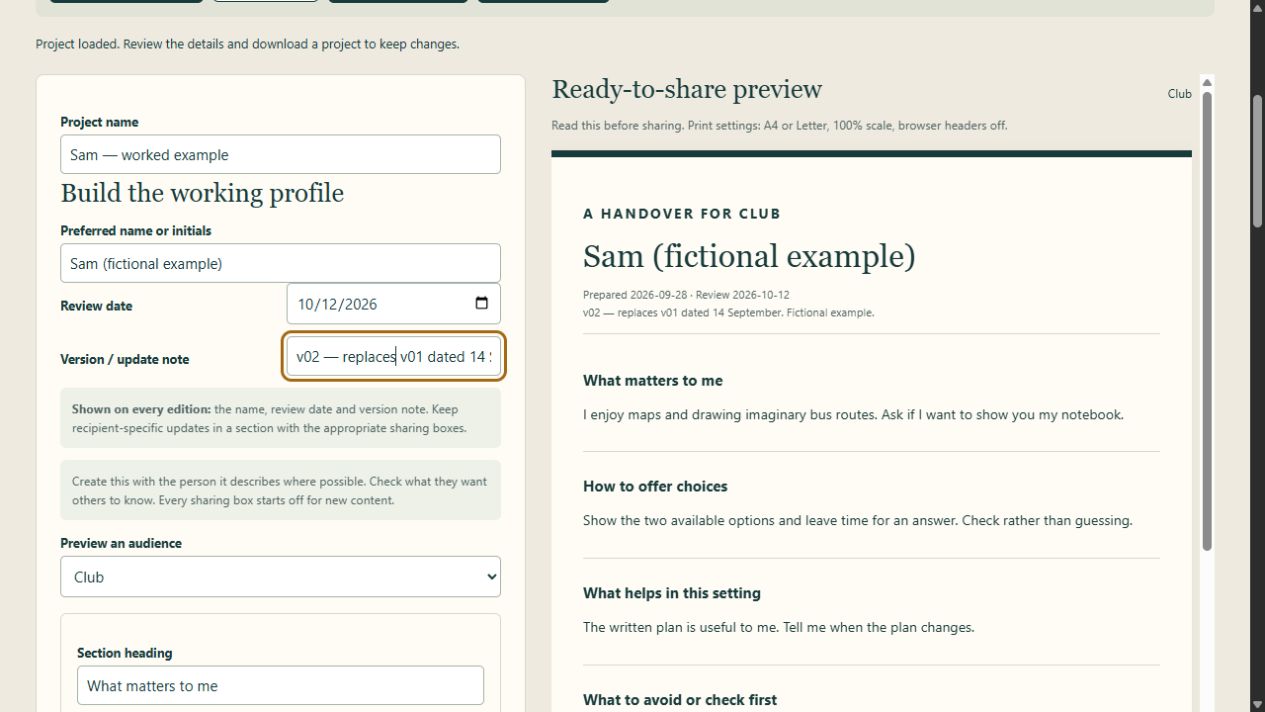
Use a short edition label, date and version: Club — 28 September 2026 — v02. Identify the copy it replaces: Club — 14 September 2026 — v01. A filename such as club-profile-2026-09-28-v02.pdf is easier to distinguish from “final-new.pdf”. Avoid unnecessary personal information in the filename.
A review date is a reminder to check the contents. It does not guarantee that the profile remains accurate until that date. You can update it sooner when something changes.
Put the detail in the right edition
Our room update belongs in the Club edition for this example. It does not automatically belong in a School copy. Re-read the selected output after editing; do not assume a change in the working file appears in every audience's version.
In Handover Studio: the name, review date and version note appear in every edition. Keep the version note neutral, for example “v02 — replaces v01 dated 14 September”. Put a recipient-specific change in its own section and tick the audience that needs it. Version 1.0.1 makes this distinction explicit beside the field.
For the built-in fictional example, update “What has changed”, select its Club sharing box and clear its School box. Preview Club: the new detail should appear. Preview School: it should be absent. Decide separately whether Familiar adult needs the information. This is an editing demonstration, not a rule about who must receive a real child's information.
Add a short replacement message
Subject: Updated Club profile — v02, 28 September
Please use the attached Club profile, v02 dated 28 September, in place of v01 dated 14 September. The changed section is “What has changed”. It records the confirmed room change and Sam's request to see the room before the activity. Please replace the earlier working copy and let me know whether this version reached the appropriate person. If any detail differs from your understanding, please tell me so I can check it.
This is a fictional draft to adapt and send yourself through your normal agreed channel. Check the recipient and attachment before sending. A message saying “attached” is not proof that the right file was attached.
Track what actually happened
A simple row is enough: Edition | Version/date | Replaces | Intended reader/role | Sent date | Receipt confirmed? | Next check. Keep this tracker private. Use a role instead of unnecessary identifying information, and leave sensitive profile contents out of it.
Example: Club | v02 / 28 September | v01 / 14 September | Club leader | 28 September | Not yet confirmed | Check at the next agreed contact.
“Sent” and “confirmed received” mean different things. Leave confirmation blank or mark it pending until you have an actual response. Receiving a file does not prove it has been read or followed. Do not invent a confirmation to make the tracker look complete.
Free replacement tracker
Download a blank CSV or the fictional Club example. Open in a spreadsheet app, or copy the seven headings into a notebook. No signup. Keep your completed tracker private.
Keep the working project separate
Share only the reviewed output intended for that reader. A Handover Studio project JSON contains the whole working profile, including sections excluded from the chosen edition. Keep it private as your editable backup.
The app cannot send the replacement, withdraw an old attachment from someone else's device or confirm receipt. Those steps remain with you and the people using the profile. The purpose of the tracker is to make the next check visible, not to claim control over their files.
Optional: reuse your working profile
You can use this method with a document and the free tracker. If you want one editable profile with separate School, Club and Familiar adult outputs, review dates and neutral version notes, Handover Studio is €15 once, as a desktop browser download. It is an independent organizational tool; it does not replace formal health, emergency or education processes.
See Handover Studio — €15 once
Sources and checks
CALL Scotland's guidance on gathering information for communication passports supports involving the individual and people who know them, and identifying people responsible for maintaining the resource. It does not endorse Handover Studio or this original replacement-and-receipt workflow.
The audience selection and shared version-note behavior above were checked in a local browser using fictional information on 28 September 2026. Physical printing, independent family testing and all browser/device combinations remain unverified. No real child records were used or collected.